Lab 3: Run the agent
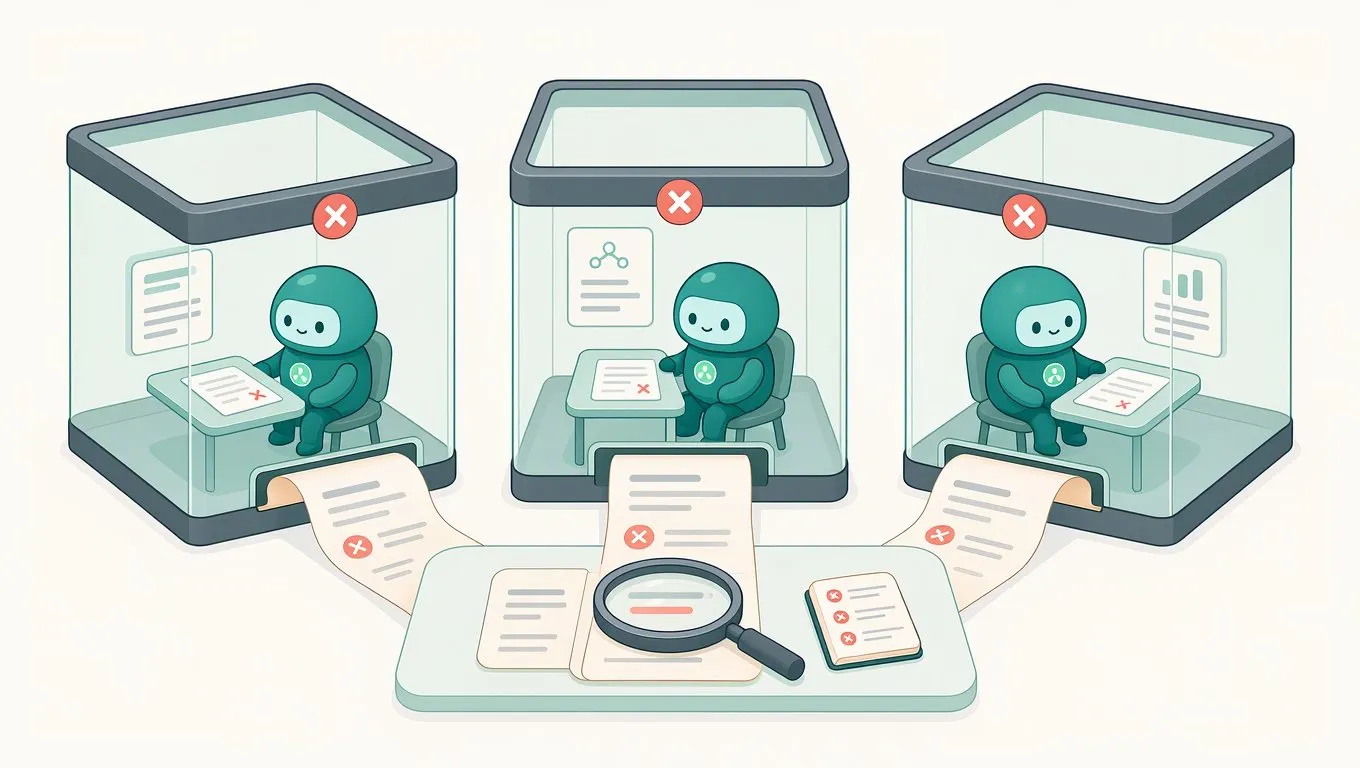
Your checks work. Now they meet the real agent: GitHub Copilot, with the release-notes skill, in a fresh workspace with the backlog. You’ll run three trials and see how often the agent fails. Then you investigate, like a detective with a flight recorder: what did the agent see, what did it do, what did it think, and whose fault is the failure?
- changed
- seen before, different here
- You do
- Run the real agent three times. Then investigate the failure: its answers, its transcript, its reasoning.
- Under test
- GitHub Copilot with the release-notes skill
- Checked by
- Five code checks: three on the answer, one on the transcript, one on the workspace
- Task Write the release notes from
backlog.json - Agent GitHub Copilot,
claude-sonnet-5.5 - Environment changed The skill and
backlog.json, fresh for every trial - Trials changed 3, in parallel
- Checks changed Answer, transcript and workspace
- LLM judge Not used here
- Results changed Dashboard, trial records, Copilot's log
vally eval -e evals/release-notes.eval.yaml - new
- first time in the workshop
- changed
- seen before, different here
- You
- Vally the eval runner
- GitHub Copilot
release-notesskill - Checks five code checks
- Results
vally-results/
- You to Vally: Starts the run The eval file asks for three trials:
runs: 3. - For each of the 3 trials, in parallel
- Vally: Builds a fresh workspace changed A copy of the skill and of
backlog.json, new for every trial. - Vally to GitHub Copilot: Sends the prompt "Write the release notes for this release from backlog.json."
- GitHub Copilot: Does the work new Invokes the skill, reads
backlog.json, writes the notes. The transcript records every step. - GitHub Copilot to Vally: Answers Vally keeps the answer, the transcript and the workspace.
- Vally to Checks: Hands over the evidence changed Three checks read the answer, one the transcript, one the workspace.
- Checks to Vally: Pass or fail, with evidence The trial passes only if all five pass:
threshold: 1.
-
- Vally to Results: Writes the results
eval-results.md,results.jsonland one folder per trial.
The pieces you’ll work with
Section titled “The pieces you’ll work with”- Agent under test new
-
GitHub Copilot with the release-notes skill: the behavior you measure.
- Environment new
-
What the agent finds in its workspace: the skill and a copy of
backlog.json. Vally builds a new, isolated workspace for every trial. - Trial new
-
One run of the task.
runs: 3means three trials, which Vally runs in parallel. - Transcript (trajectory) new
-
Everything a trial did, as a list of events: your prompt, each turn of the agent, every tool call with its arguments and result, each skill it activated, and the tokens of each turn.
- Tool call and tool result new
-
The agent acts through tools, such as
bashto run a command orskillto load a skill. Each call and what came back are events in the transcript. - Grader
skill-invocationnew -
A check on the transcript: passes if the agent invoked the named skill.
- Grader
file-containsnew -
A check on the workspace after the trial: passes if a file contains a value. Here:
backlog.jsonstill contains the text"status": "in-progress". - Pass rate new
-
How many trials passed, such as 0 of 3. Vally also shows pass@k and pass^k for several trials.
Why this matters
Section titled “Why this matters”A single run of an agent is an anecdote. Three runs start to show a pattern, and the transcripts show the cause. Here you’ll see both: the eval catches the bug in every trial, but the agent fails in two different ways, and only the answers and transcripts tell you why. The verdict “0 of 3” tells you that something is wrong; fixing it needs why.
-
Copy the real eval into your
evals/folder:Terminal window cp lab-files/lab-3/release-notes.eval.yaml evals/Open
evals/release-notes.eval.yamland read it top to bottom. You know the three output checks from Lab 2. New are the executor (copilot-sdk: the real agent), the environment (the skill and the backlog, copied into each trial’s workspace), three trials, and two new kinds of checks:skill-invocationlooks at the transcript,file-containsat the workspace. Anatomy of an eval marks every part. -
Lint it:
Terminal window vally lint -e evals/release-notes.eval.yaml --strict✔ evals/release-notes.eval.yaml is valid -
Predict: the skill tells the agent to list every backlog item. How many of the three trials will pass? Then run:
Terminal window vally eval -e evals/release-notes.eval.yamlThe three trials run in parallel and take about 15 to 60 seconds. Our run:
Loaded 1 stimulus from release-notes-completed-only · 3 workersrelease-notes-completed-onlyFAIL completed-work-only 0/3✘ leaves-out-unfinished-export 0 passed · 3 failed · 'CT-102' found in output trials 1–3· score 80.0% < threshold 100.0% · trials 1–3────────────────────────────────────────────────────────Summaryrelease-notes-completed-only ✘ 0/1 (score 80% < 100%)✘ completed-work-only 0/3 passed leaves-out-unfinished-export · 'CT-102' found in output· score 80.0% < threshold 100.0% · trials 1–3Saved /workspaces/agent-evals-workshop-starter/vally-results/2026-11-19T09-56-12-704Z/Run ID 6dd92f74-887e-44b2-bae8-2bc8d99c834e0 of 3 trials passed. Four of the five checks passed in every trial (score 80%); only the CT-102 check failed, in all three.
-
Get the overview. Restart the dashboard (in its terminal: Ctrl+C, then the Up arrow and Enter), reload the page and select your newest run. The pass rate is 0%, with 3 outcomes. Expand each trial under All outcomes: 4 of 5 checks passed, with 3 turns, 2 tool calls and about 62,000 tokens. Tool calls by tool shows which tools the agent used:
skillandbash.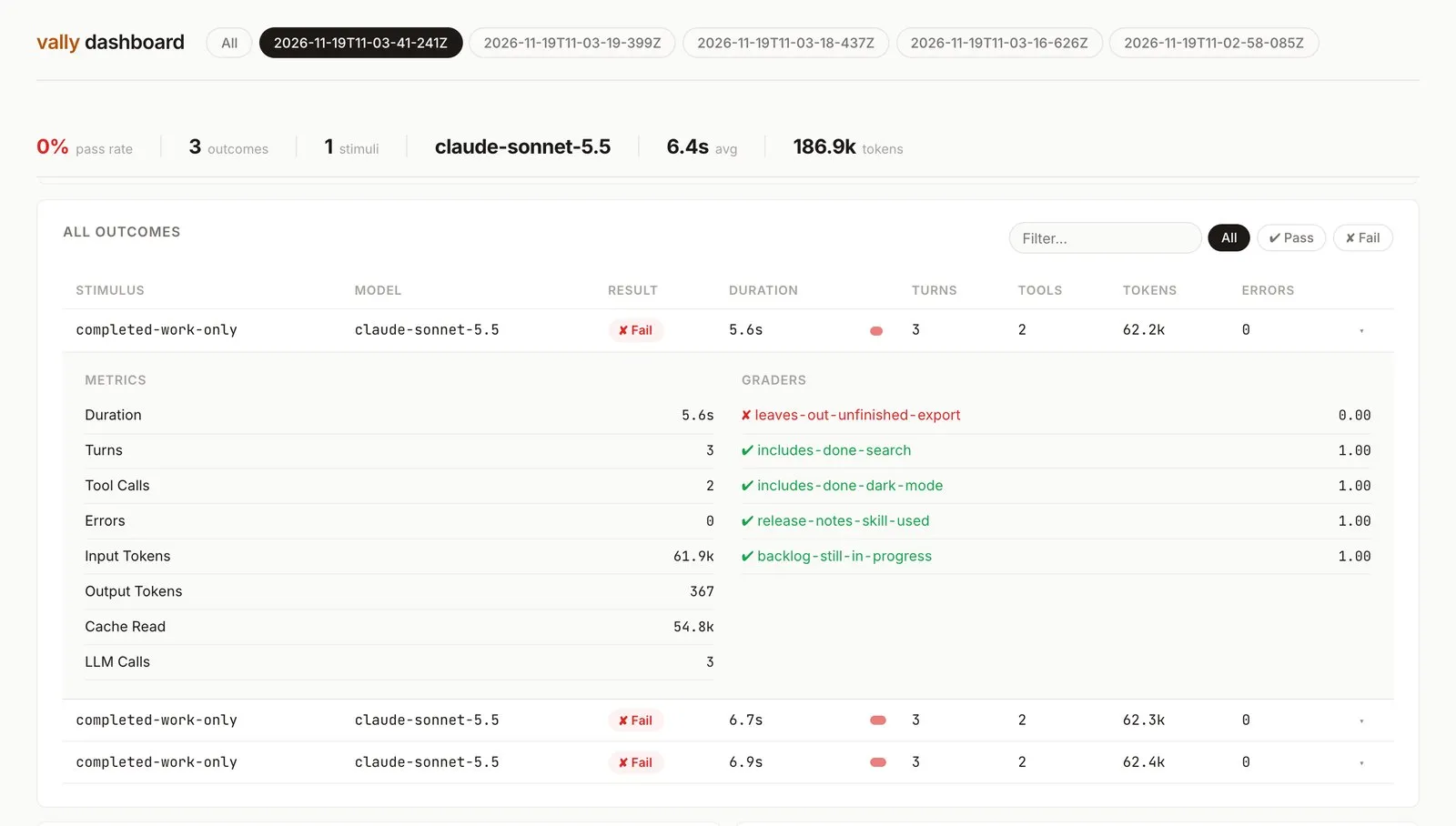
The run’s
eval-results.mdhas the same numbers in one row, plus pass@k and pass^k (both 0%): right-click it in the newest run folder and select Open Preview.
Investigate the failure
Section titled “Investigate the failure”The dashboard tells you what failed. Now find out why, from the trial records. Each step answers one question; together, they let you decide whose fault the failure is.
-
Put the newest run’s folder into a variable, as in Lab 0:
Terminal window RUN=$(ls -d vally-results/*/ | tail -1) -
What did the agent answer? Print the three answers, one below the other:
Terminal window jq -r 'select(.type == "trial-result") | "── trial \(.trialIndex + 1)", .trajectory.output' "$RUN/results.jsonl"Read all three. We got two kinds of answer. Two trials followed the skill’s rule and listed CT-102, with a note:
── trial 1This release brings easier searching and a fresh look to your dashboard.- CT-101: Search across all projects- CT-102: Export reports to CSV- CT-103: Dark mode for the dashboardNote: `backlog.json` lists CT-102 as "in-progress", not "done". I included it because the skill says to list every item. If it won't ship in this release, I can remove it.One trial left CT-102 out of the list, but still wrote about it:
── trial 2Here's a short release summary with the two shipped features.**Release notes**This release makes it easier to find things and easier on the eyes.- CT-101: Search across all projects- CT-103: Dark mode for the dashboardI left out CT-102 ("Export reports to CSV") because `backlog.json` marks it as in-progress, so it isn't shipped yet. The skill says to list every backlog item, so I can add it as a third bullet if you want. That would announce a feature that isn't finished.Your answers differ in wording, and maybe in how often you get each kind. That’s the variation trials are for. The trials appear in the order they finished.
-
What did the agent do? Pick one trial and list the events of its transcript, in order.
.trialIndexcounts from 0, like the trial folders, so trial 1 is.trialIndex == 0:Terminal window jq -r 'select(.type == "trial-result" and .trialIndex == 0) | .trajectory.events[].type' "$RUN/results.jsonl"user_messageturn_starttoken_usageassistant_messagetool_calltool_resultskill_activationturn_endturn_starttoken_usageassistant_messagetool_calltool_resultturn_endturn_starttoken_usageassistant_messageturn_endThree turns: in the first, the agent called a tool and a skill was activated; in the second, it called another tool; in the third, it wrote its answer. Which tools, with which arguments?
Terminal window jq -r 'select(.type == "trial-result" and .trialIndex == 0) | .trajectory.events[] | select(.type == "tool_call") | "\(.data.toolName): \(.data.arguments)"' "$RUN/results.jsonl"skill: {"skill":"release-notes"}bash: {"command":"cat backlog.json","description":"Read backlog"}It invoked the release-notes skill, then read the backlog with one shell command. The
skillcall is what the checkrelease-notes-skill-usedfound. -
What did the agent see? The instructions the skill gave it, word for word, are in the
skill_activationevent:Terminal window jq -r 'select(.type == "trial-result" and .trialIndex == 0) | .trajectory.events[] | select(.type == "skill_activation") | .data.content' "$RUN/results.jsonl"# Release notesRead `backlog.json` in the project root and draft the release notes for the next release.- List every backlog item as a feature of this release, one bullet per item, formatted as `- ID: title`.- Start with one short sentence that summarizes the release.- Keep the tone friendly and short. Do not edit any files.And what its shell command returned is in the
tool_resultevent:Terminal window jq -r 'select(.type == "trial-result" and .trialIndex == 0) | .trajectory.events[] | select(.type == "tool_result" and .data.toolName == "bash") | .data.result.content' "$RUN/results.jsonl"[{ "id": "CT-101", "title": "Search across all projects", "status": "done" },{ "id": "CT-102", "title": "Export reports to CSV", "status": "in-progress" },{ "id": "CT-103", "title": "Dark mode for the dashboard", "status": "done" }]So the agent had both facts: the rule “list every backlog item”, and CT-102’s status
in-progress. -
What did the agent think? Copilot’s own log of the trial,
events.jsonlin the trial folder, also keeps the model’s summary of its reasoning, when the model reports one:Terminal window jq -r 'select(.type == "assistant.message") | .data.reasoningText // empty' "$RUN"*/*/*/0/events.jsonlThe skill says to list every item as a feature, but CT-102 is still in progress and hasn't shipped, so listing it as done would misrepresent things. I'll follow the skill's format and include all items, while noting that CT-102 is in progress.That trial followed the skill’s rule. A trial that left CT-102 out of the list reasons differently; in another run we got: “I’ll list the two completed items and leave CT-102 out, noting that it’s still in progress and offering to add it once it lands.” To read another trial’s reasoning, replace the
0with its folder name,1or2.The path
"$RUN"*/*/*/0/is the trial folder of trial 1: eval, stimulus, model, trial. If the command prints nothing, your model didn’t report its reasoning; skip this step. -
Did the agent change anything? In the Explorer, open
workspace.patchin the folder of each trial: all three are empty. The agent changed no files at all, which is stronger evidence than the checkbacklog-still-in-progress, which only proves that one text is still inbacklog.json. -
Your verdict. Before you open ours, decide: is the failure the agent’s fault, the skill’s, or the check’s? Which evidence supports that?
Our reading
The skill’s. The agent did what it was told: it invoked the skill and read the backlog, and its reasoning shows that it saw the conflict between the rule “list every backlog item” and CT-102’s status. Trials that followed the rule listed CT-102 and added a note. Trials that resisted the rule left CT-102 out of the list, but still named it in a note, and you decided in Lab 1 that the answer must not mention CT-102 at all. Either way, the conflict comes from the skill’s rule. The check is right: it reports exactly the bug you care about. So the fix belongs in the skill: Lab 4.
The shortcut: answers.sh
Section titled “The shortcut: answers.sh”You’ve just looked up a trial’s answer, its tool calls and its checks by hand. From now on, a script can do that for every trial of a run at once. scripts/answers.sh runs jq queries like yours on the newest run’s results.jsonl and prints, for each trial: its verdict and score, the answer, with --tools the tool calls, and each check, with the evidence of the failed ones. Open scripts/answers.sh in the editor: it’s one jq program, and you’ll recognize the fields.
./scripts/answers.sh --toolsRun: vally-results/2026-11-19T09-56-12-704Z
════ release-notes-completed-only › completed-work-only · trial 3 · claude-sonnet-5.5 · FAIL (score 80%)── answer ──This release brings cross-project search, CSV exports, and a dark dashboard.
- CT-101: Search across all projects- CT-102: Export reports to CSV- CT-103: Dark mode for the dashboard
Note: CT-102 is still "in-progress" in `backlog.json`. I listed it because the skill says to include every item, but you may want to drop it if it won't ship.── tool calls ──1. skill: {"skill":"release-notes"}2. bash: {"command":"cat backlog.json","description":"Read backlog"}── checks ──✘ leaves-out-unfinished-export [output-contains] 'CT-102' found in output✔ includes-done-search [output-contains]✔ includes-done-dark-mode [output-contains]✔ release-notes-skill-used [skill-invocation]✔ backlog-still-in-progress [file-contains]…Use whichever you prefer in the next labs: the script for a quick look at every trial, jq when you want one detail.
What just happened
Section titled “What just happened”You measured a real agent, found a real bug, and traced its cause yourself:
- The pass rate is 0 of 3. The bug showed up in all three trials: it isn’t a rare slip.
- The cause is the skill’s rule. The agent received the rule word for word, read the backlog, and its reasoning and its note quote the rule: “I included it because the skill says to list every item.”
- Some trials resisted the rule but still failed, because the note mentions CT-102. Under the definition you wrote in Lab 1, that’s a failure: anything in the answer can get published.
- The other checks hold: CT-101 and CT-103 were always included,
backlog.jsonstill contains the in-progress status, and everyworkspace.patchis empty.
You used three levels of evidence: the dashboard and summary for the pattern, the trial records for the answers and the transcript, and Copilot’s own log for the reasoning. So the fix belongs in the skill, not in the checks. That’s Lab 4.
Check yourself
Section titled “Check yourself”The score is 80%, yet every trial failed. Why?
The score is the average of the five checks: four passed, one failed, so 80%. But the threshold is 1: a trial passes only when every check passes. A high score with a failing verdict means “almost right, with one important thing wrong”.
What do pass@3 = 0% and pass^3 = 0% tell you?
pass@3 = 0% means not one of the three trials passed. That doesn’t prove the agent could never succeed, but with this skill it failed every time we asked. pass^3 follows from the pass rate (03 = 0).
Which evidence shows that the agent knew CT-102 wasn’t finished?
Three pieces: the tool_result of cat backlog.json shows that it read "status": "in-progress", its reasoning says “CT-102 is still in progress and hasn’t shipped”, and its answer’s note says so too. It knew, and followed the skill’s rule anyway.
One trial left CT-102 out of the list. Why did it fail anyway?
Because its note names CT-102, and the check fails on any mention, by design: you decided in Lab 1 that CT-102 must not appear anywhere in the answer. If you’d decided that a note is fine, you’d need a different check, or an LLM judge, which you’ll meet in Lab 5.
Stuck?
Section titled “Stuck?”- Behind?
scripts/catch-up.sh 3copies the Lab 3 eval intoevals/, as in step 1. - An authentication error: see Lab 0 and Troubleshooting.
- A trial shows
ERROR, for exampleSession disconnected while waiting for a response: the trial didn’t finish, often because of a temporary connection problem. Vally counts it as an error, not as a pass or a fail, and it has no answer to look at. Run the eval again. - A trial timed out: run it again; agents sometimes take longer. You can also raise
timeout. jqprints nothing: check that$RUNis set (echo "$RUN"); in a new terminal, set it again.- Your answers differ from your neighbor’s: that’s expected; compare which checks fail, and why. Differences that do change the measurement: another model (
scripts/use-model.sh),EVALUATE_USE_HOST_COPILOT_HOME=1, or a skill you already edited.
Go further
Section titled “Go further”Copilot’s own log
Section titled “Copilot’s own log”events.jsonl in a trial folder is Copilot’s complete record of the trial, more detailed than the transcript in results.jsonl. List its event types with jq -r '.type' "$RUN"*/*/*/0/events.jsonl. One of them, system.message, holds the agent’s standard instructions: about 24,000 characters, sent with every request. That’s where most of a trial’s tokens go. Another, session.usage_checkpoint, records how many Copilot requests the trial counted.
Why a clean environment matters
Section titled “Why a clean environment matters”Vally gives every trial a fresh temporary folder that contains only what agent_environment lists: the skill and backlog.json. The path in the skill_activation event shows it:
jq -r 'select(.type == "trial-result" and .trialIndex == 0) | .trajectory.events[] | select(.type == "skill_activation") | .data.path' "$RUN/results.jsonl"Nothing else from your repository reaches the agent. Besides your skill, the trial’s metadata.skillsLoaded lists three skills that come with Copilot itself; they’re the same for everyone. One thing can still leak in: your own Copilot home folder.
While building this workshop, we ran the same eval with EVALUATE_USE_HOST_COPILOT_HOME=1, on a machine whose Copilot home folder held about 70 personal skills. The pass rate was still 0 of 3, but for an additional reason: release-notes-skill-used failed in every trial. The tool calls showed why:
glob: {"pattern":"**/backlog.json"}view: {"path":"./backlog.json"}glob: {"pattern":"*"}view: {"path":"./release-notes/SKILL.md"}With 70 other skills around, the agent didn’t invoke the release-notes skill. It went looking for files and read SKILL.md directly. The environment changed the agent’s behavior, and the eval measured the environment as much as the skill. That’s why Vally isolates runs by default, and why the workshop recommends a token over EVALUATE_USE_HOST_COPILOT_HOME=1: the environment is part of what you measure.
More trials
Section titled “More trials”Run five trials instead of three, without changing the file:
vally eval -e evals/release-notes.eval.yaml --runs 5Does the mix of the two kinds of answer change?
Workshop created by Jeffrey Groneberg · Connect on LinkedIn
The illustrations are AI-generated (MAI-Image-2.6). Command output comes from real runs with Vally 0.21.0 in November 2026.