Lab 0: Set up and check

Before you write a real eval, make sure the whole chain works: your terminal, the tools, your Copilot sign-in, and a real run. A problem found now costs a minute; found in Lab 3, it costs your momentum. Then take a first look at what a run leaves behind. You’ll read results in every lab, and it’s easiest to learn your way around while the run is tiny.
- You do
- Check your tools and sign-in, run one tiny real eval, and find your way around its results.
- Under test
- Your setup: can Vally reach GitHub Copilot with your sign-in?
- Checked by
- One code check: does the answer contain
READY?
- Task Reply with the single word READY
- Agent GitHub Copilot,
claude-sonnet-5.5 - Environment An empty, fresh workspace
- Trials 1
- Checks
output-containson the answer - LLM judge Not used here
- Results Run folder, trial record, dashboard
vally eval -e lab-files/lab-0/setup-check.eval.yaml - You
- Vally the eval runner
- GitHub Copilot
claude-sonnet-5.5 - Check
answer-says-ready - Results
vally-results/
- You to Vally: Starts the run Vally reads the eval file: one task, one trial.
- Vally: Builds a fresh, empty workspace And starts GitHub Copilot in it, with your sign-in.
- Vally to GitHub Copilot: Sends the prompt "Reply with the single word READY and nothing else. Do not use any tools."
- GitHub Copilot to Vally: Answers
READYNo tools needed: one turn, about 20,000 tokens. - Vally to Check: Hands over the answer The check looks for
READYin it. - Check to Vally: Pass, with evidence An error instead means the run itself failed, for example the sign-in.
- Vally to Results: Writes the results
eval-results.md,results.jsonland the trial's folder.
The pieces you’ll work with
Section titled “The pieces you’ll work with”- Vally CLI new
-
The command-line tool that runs evals:
vally lintchecks an eval file,vally evalruns it,vally serveshows the results in your browser. - Eval file new
-
A YAML file that describes an eval: what to ask, which agent to run, and how to check the answer.
- Executor new
-
The part of Vally that runs the agent.
copilot-sdkruns GitHub Copilot as the agent under test. - Copilot sign-in new
-
The token that lets Vally send requests to Copilot for you: your Codespace's own
GITHUB_TOKEN, or, on your computer,COPILOT_GITHUB_TOKEN, which.envreads from your GitHub CLI sign-in. - Run folder new
-
Everything one
vally evalsaved: a summary table, one record per trial, and one folder per trial. - Trial record new
-
One line of
results.jsonlper trial: the agent's final answer, its transcript, its metrics and the verdict of every check, with evidence. - Dashboard new
-
Vally's results viewer in the browser: pass rates, checks and metrics for every run, side by side.
-
Open your copy of the starter repository in VS Code: your Codespace (see Set up in a Codespace), or your clone on your computer. Open a terminal with Terminal > New Terminal. Every command in the labs runs there, in the repository’s root folder. On your computer, load your settings into the new terminal first:
set -a; source .env; set +a. -
Check your tools and settings:
Terminal window ./scripts/check-setup.shThe script asks each tool for its version, looks for your Copilot sign-in (without showing the token), and reads the model names from the eval files. It sends nothing anywhere; open
scripts/check-setup.shto see how it does that.Every line under Tools and under GitHub Copilot sign-in needs a green check mark. Under Your own model endpoint, “Not set, and not needed” is fine: the LLM judge in Lab 5 runs on your Copilot plan unless you set up your own endpoint. If something is red, the line tells you what to do.
-
Open the eval you’re about to run,
lab-files/lab-0/setup-check.eval.yaml:lab-files/lab-0/setup-check.eval.yaml # Lab 0: one tiny real run. It proves that Vally can reach GitHub Copilot with your sign-in.# It uses one Copilot request. Run it with:# vally eval -e lab-files/lab-0/setup-check.eval.yamlname: setup-checkdescription: One small real run that checks that the agent under test (GitHub Copilot) answers.defaults:executor: copilot-sdk # the agent under test: GitHub Copilot, driven through the Copilot SDKmodel: claude-sonnet-5.5 # pinned, so results are comparable (scripts/use-model.sh changes it)runs: 1 # one trial is enough for a connection checktimeout: 120sstimuli:- name: says-readyprompt: Reply with the single word READY and nothing else. Do not use any tools.graders:- type: output-containsname: answer-says-readyconfig: { substring: READY }It asks Copilot to answer with one word, and one check passes if the answer contains
READY. You’ll learn every line in the next labs. -
Run it:
Terminal window vally eval -e lab-files/lab-0/setup-check.eval.yamlAfter 20 to 40 seconds, you see:
Loaded 1 stimulus from setup-checkSummaryPASS setup-checkSaved /workspaces/agent-evals-workshop-starter/vally-results/2026-11-19T07-11-30-365Z/Run ID 5c8e4af2-5b94-4a6c-a945-217eb8ae243aYour folder name and run ID differ: they’re the date and time of your run, and a random ID. On your computer, the path starts with your clone’s folder. The first time you run Vally, it also prints a short notice about usage telemetry, with how to opt out (
VALLY_TELEMETRY_OPTOUT=1).
Find your way around the results
Section titled “Find your way around the results”PASS is the headline. To judge a run yourself, you need the details behind it: what the agent answered, what it did, and why each check decided the way it did. Vally saved all of that in the run folder.
-
In the Explorer, expand
vally-results, then your run’s folder, and the folders inside it:vally-results/└── 2026-11-19T07-11-30-365Z/ one folder per run, named after its start time├── eval-results.md the summary table, for people├── results.jsonl one record per trial: answer, transcript, metrics, verdicts├── otel-spans.jsonl timing data for tracing tools; you can ignore it└── setup-check/ the eval└── says-ready/ the stimulus, that is, the task└── claude-sonnet-5.5/ the model└── 0/ the trial; trial folders count from 0├── events.jsonl Copilot's own, complete event log of the trial├── metadata.json the trial's settings and status└── workspace.patch every change the agent made to its files -
The summary. Right-click
eval-results.mdand select Open Preview. It has one row per stimulus: the checks with how many trials passed them, the pass rate, the duration, the tokens, the turns, the tool calls and the verdict. Here:answer-says-ready 1/1, about 20,000 tokens, 1 turn, 0 tool calls. -
The trial record. In the terminal, put the path of your newest run into a variable:
Terminal window RUN=$(ls -d vally-results/*/ | tail -1)Run folders are named after their start time, so the last one in the list is the newest. The next commands use
$RUN; in a new terminal, set it again.results.jsonlhas one line per trial, with"type": "trial-result", and a last line that summarizes the run. Each line is a JSON object;jqpicks the trial and shows a few of its fields:Terminal window jq 'select(.type == "trial-result") | {stimulus, answer: .trajectory.output, passed: .gradeResult.passed, score: .gradeResult.score}' "$RUN/results.jsonl"{"stimulus": "says-ready","answer": "READY","passed": true,"score": 1}.trajectoryholds what the agent did;.gradeResultholds what the checks decided. -
The transcript. Everything that happened during the trial is a list of events in
.trajectory.events. List their types, in order:Terminal window jq -r 'select(.type == "trial-result") | .trajectory.events[].type' "$RUN/results.jsonl"user_messageturn_starttoken_usageassistant_messageturn_endYour prompt (
user_message), then one turn of the agent: the tokens that turn used, and the agent’s message. There’s notool_callevent: the agent answered without using a tool, as the prompt asked. -
The tokens. Look at the
token_usageevent:Terminal window jq -c 'select(.type == "trial-result") | .trajectory.events[] | select(.type == "token_usage") | .data | {inputTokens, outputTokens}' "$RUN/results.jsonl"{"inputTokens":20292,"outputTokens":4}About 20,000 tokens in, 4 tokens out, for the word READY. The input is mostly the agent’s standard instructions and the descriptions of its tools, which go along with every request. Keep that in mind when you estimate what evals cost.
-
The verdict, with its evidence. Every check reports whether it passed and why:
Terminal window jq 'select(.type == "trial-result") | .gradeResult.details[] | {name, passed, evidence}' "$RUN/results.jsonl"{"name": "answer-says-ready","passed": true,"evidence": "'READY' found in output"} -
The trial folder. In the Explorer, open the trial’s
workspace.patch: it’s empty, because the agent changed no files. Openmetadata.json:"status": "success"means the trial ran to the end. A trial that broke off, for example because of a connection problem, says"error"there.
You’ve now seen the three levels you’ll use in every lab: the summary (is it good?), the trial record (what did the agent answer and do, and why did each check decide that way?) and the trial folder (what changed in the workspace?). events.jsonl in the trial folder is Copilot’s own, more detailed log of the same trial; you’ll rarely need it.
The dashboard
Section titled “The dashboard”The dashboard shows the same results in your browser, for all your runs at once. Start it now, and come back to it after every lab.
-
Open a second terminal with the + in the terminal panel, so the dashboard can keep running there. Start it:
Terminal window vally serve vally-results --port 3200 --allowed-host "${CODESPACE_NAME}-3200.${GITHUB_CODESPACES_PORT_FORWARDING_DOMAIN}"--allowed-hostlets the address of your Codespace’s forwarded port reach the dashboard. On your computer, those two variables are empty, and the option changes nothing. -
Open it. In a Codespace, a notification offers Open in Browser for port 3200; you also find the port in the Ports panel. On your computer, open
http://localhost:3200. -
Look around. At the top, one button per run, named like its folder; select yours. Below, the pass rate, the number of outcomes (trials) and the tokens. Scroll down to All outcomes and expand your trial with ▾: its duration, turns, tool calls and tokens, and each check with its score.
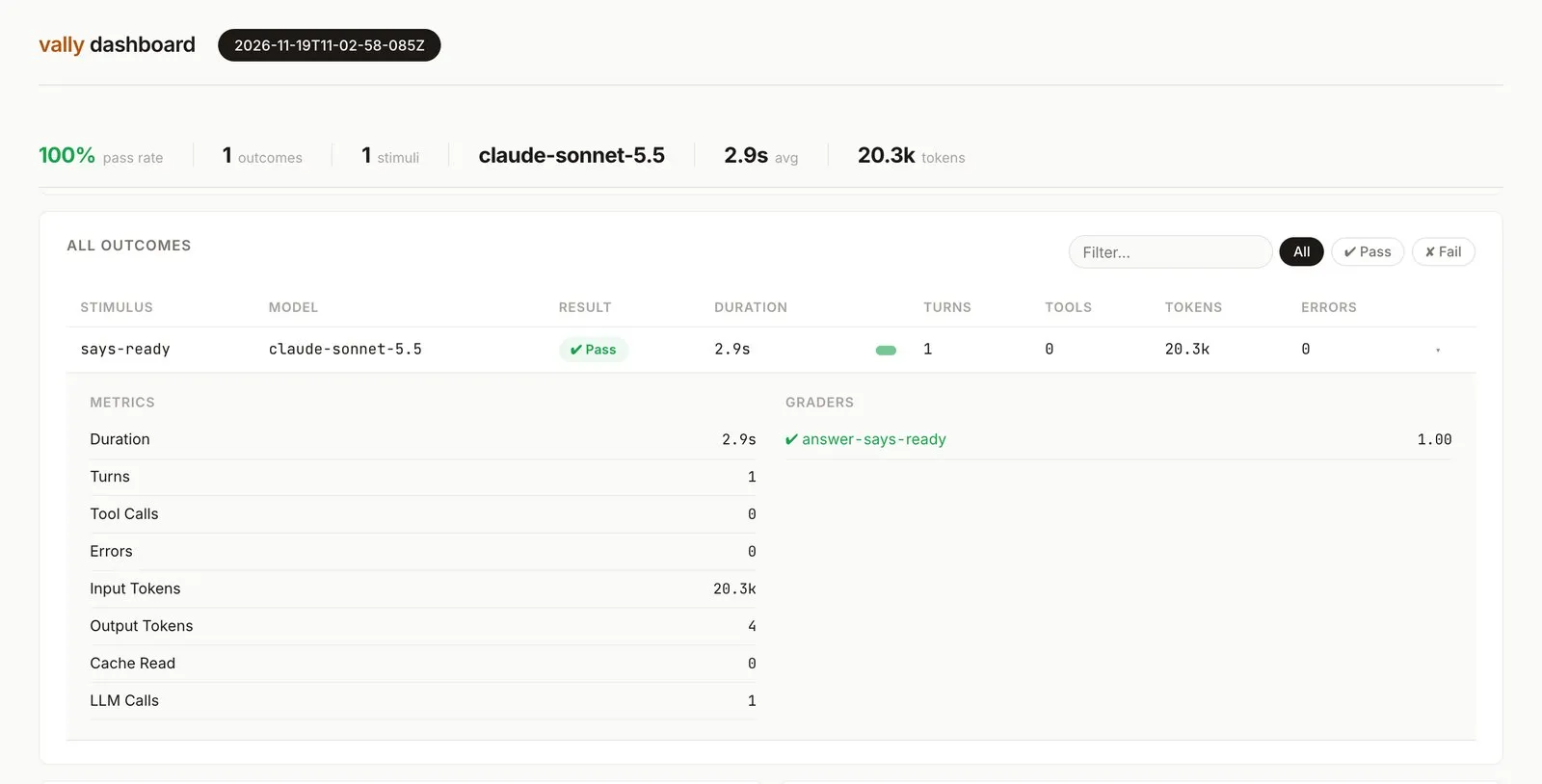
The dashboard reads the results folder when it starts. After each lab, restart it to see your new runs: select its terminal, press Ctrl+C, then the Up arrow and Enter.
The dashboard shows what happened: verdicts, scores and metrics, for one run or several. The answers, the transcripts and the evidence, the why, are in results.jsonl. You’ll use both.
What just happened
Section titled “What just happened”Vally read the eval file, built a fresh, empty workspace, started GitHub Copilot in it with your token, and sent the prompt. Copilot answered READY without using any tools. Then Vally ran the one check, found READY in the answer, and saved everything in a new run folder: the summary table, one trial record, and the trial’s folder.
Check yourself
Section titled “Check yourself”What would have happened if your token were wrong?
The run would end with ERROR and Not authenticated. Please authenticate first. instead of a PASS or FAIL. Vally separates the two: a FAIL means the agent ran and a check failed; an error means the run itself couldn’t happen. With an error, vally eval exits with code 1, and the trial’s metadata.json says "status": "error".
Why does a four-token answer use about 20,000 tokens?
Every request to the agent includes its standard instructions and the descriptions of all of its tools. Your prompt is a tiny part of that. Longer tasks add the files the agent reads, its tool calls and its answers. The token_usage events in the transcript show the count for each turn.
Where do you look to find out what the agent answered?
In the trial record: .trajectory.output in the trial’s line of results.jsonl. The summary table and the dashboard show only the verdicts and the numbers.
Stuck?
Section titled “Stuck?”check-setup.shsaysNo sign-in found, orvally evalreportsNot authenticated. Please authenticate first.: in a Codespace, open a new terminal and try again. On your computer, rungh auth login, thenset -a; source .env; set +aagain. Still failing? Give Vally a token of its own: see If Lab 0 can’t sign in in Set up in a Codespace or Set up on your computer.- The model isn’t available on your plan: start
copilot, type/modelto see your models, and/exit. The agent’s model is themodel:line in each eval file../scripts/use-model.sh <model-id>, for example./scripts/use-model.sh gpt-5.6-luna, changes that line in every eval file of the workshop, so the later labs use the new model too. Then run the eval again. - The dashboard says
No runs found: start it from the repository’s root folder, after at least one run, and keep the folder namevally-results. - More in Troubleshooting.
Next: Lab 1: Define good
Workshop created by Jeffrey Groneberg · Connect on LinkedIn
The illustrations are AI-generated (MAI-Image-2.6). Command output comes from real runs with Vally 0.21.0 in November 2026.