Speak and see what was heard
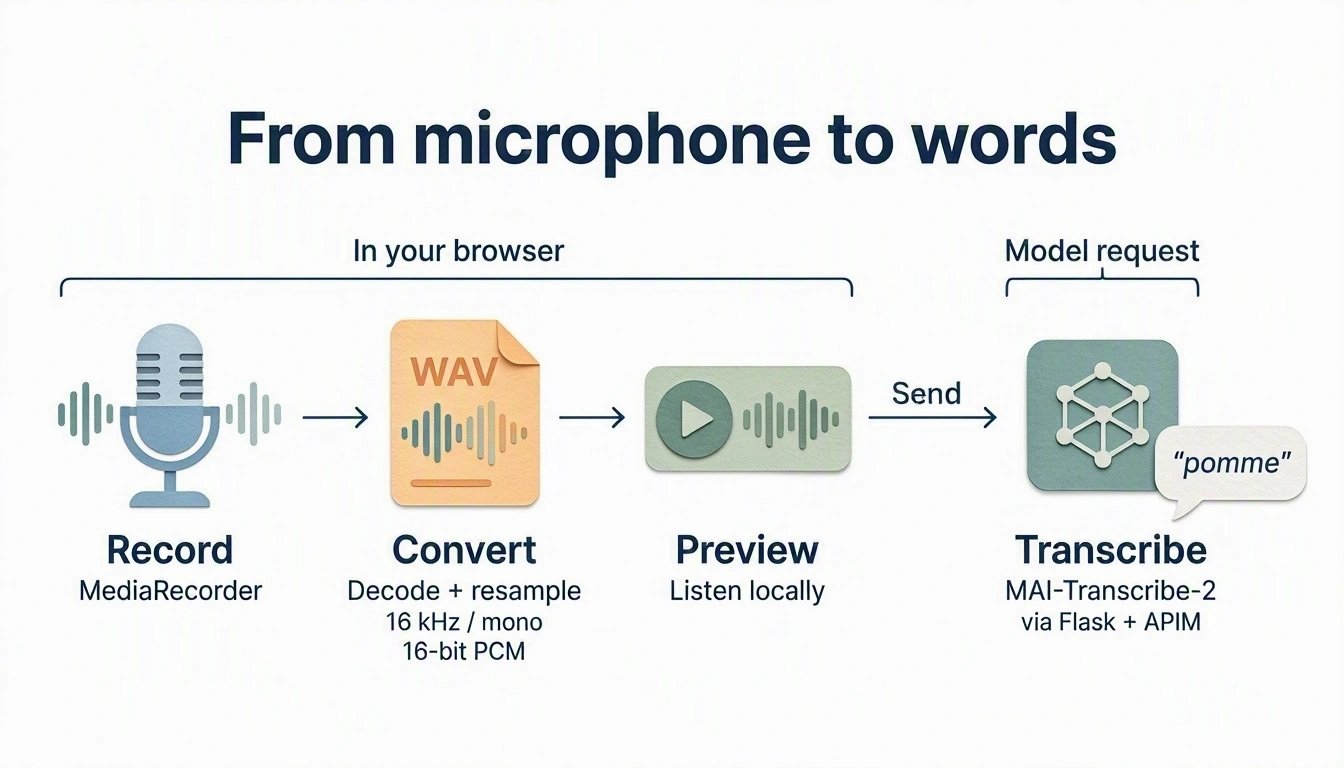
Record an answer, or choose a synthetic WAV, and show what MAI-Transcribe-2 heard. The provided recorder produces the WAV; you write the transcription route.
MAI-generated diagram. Full size.
How it works
setupAnswerRecorder() in workshop.js handles consent, the microphone, the
12-second limit, the synthetic-WAV picker, and the local preview. MediaRecorder
does not produce WAV, so the helper decodes its output, resamples it to mono
16 kHz with OfflineAudioContext, and writes 16-bit PCM. Nothing leaves the
browser until you press Send.
Your route forwards the WAV as multipart form data: an audio file plus a
JSON-encoded definition. enhancedMode selects MAI-Transcribe-2; locales
takes a language code such as fr, not fr-FR.
API details.
Build
What you'll build.
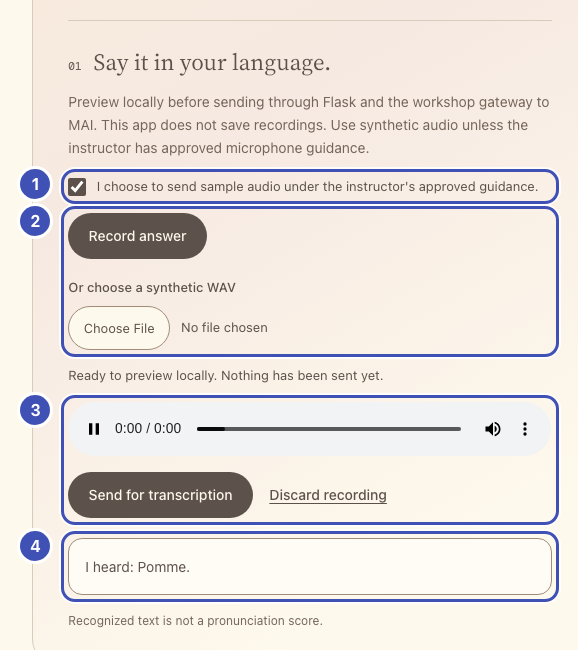
- ❶ Consent checkbox: nothing is recorded or sent until it is ticked.
- ❷ Record answer / Or choose a synthetic WAV: the provided recorder turns either into a 16 kHz WAV.
- ❸ Preview and Send: you hear the WAV first; Send posts it to your
/transcriberoute. - ❹ Transcript card: shows the text that
/transcribereturns.
The same numbers mark the highlighted lines in the code below. Keep or delete
those ❶ comments; they only link code to the picture.
1. Add the answer controls
Why a consent box and a local preview?
Audio leaves the browser only when you choose, and you hear exactly what will be sent.
In starter/templates/index.html, replace
<!-- Lesson 3: add answer controls here. --> with:
<section class="practice-step" aria-labelledby="voice-title">
  <div class="step-title"><span class="step-number">01</span><h3 id="voice-title">Say it in your language.</h3></div>
  <p class="muted">Preview locally before sending through Flask and the workshop gateway to MAI. This app does not save recordings. Use synthetic audio unless the instructor has approved microphone guidance.</p>
  <!-- ❶ -->
  <label class="consent-label"><input id="audio-consent" type="checkbox"> I choose to send sample audio under the instructor's approved guidance.</label>
  <!-- ❷ -->
  <div class="record-actions">
    <button id="record-answer" class="button primary" type="button">Record answer</button>
    <button id="stop-recording" class="button secondary" type="button" hidden>Stop recording</button>
    <label class="file-label" for="audio-file">Or choose a synthetic WAV<input id="audio-file" type="file" accept=".wav,audio/wav"></label>
  </div>
  <p id="record-status" class="status" role="status" aria-live="polite"></p>
  <!-- ❸ -->
  <audio id="audio-preview" controls hidden aria-label="Local audio, not yet sent"></audio>
  <div id="recording-review" class="record-actions" hidden>
    <button id="send-answer" class="button primary" type="button">Send for transcription</button>
    <button id="discard-recording" class="text-button" type="button">Discard recording</button>
  </div>
  <!-- ❹ -->
  <div id="answer-result" class="answer-result" role="status" hidden></div>
  <p class="fine-print">Recognized text is not a pronunciation score.</p>
</section>
2. Your turn: write /transcribe
Why multipart with a JSON definition?
The API takes the audio as a file and its options as JSON: enhancedMode
picks MAI-Transcribe-2, and locales gives the language hint that short words
need.
In starter/app.py, replace # Lesson 3: add the /transcribe route here.
with a route that follows this contract.
| Flask receives | POST /transcribe, multipart form with audio (a WAV file) and locale |
| Gateway request | POST {base}/speech/transcribe?api-version=2025-10-15 |
| Headers | Only api-key from gateway(); httpx sets the multipart type |
| Body | files={"audio": ("answer.wav", audio, "audio/wav")} and data={"definition": json.dumps(definition)} |
| Definition | {"enhancedMode": {"enabled": True, "model": "MAI-Transcribe-2"}, "locales": [language["stt"]]} |
| Flask returns | {"text": "..."} from the joined combinedPhrases[].text, or 422 if nothing was recognized |
@app.post("/transcribe")
def transcribe():
    language = language_for(request.form.get("locale"))
    upload = request.files.get("audio")
    if upload is None:
        abort(400, "Record or choose a WAV before sending.")
    audio = upload.read()
    check_wav(audio)
    base, headers = gateway()
    # TODO 1: Build the definition dict with enhancedMode and locales: [language["stt"]].
    # TODO 2: httpx.post the multipart request from the contract, with
    #         params={"api-version": "2025-10-15"} and timeout=TIMEOUT.
    # TODO 3: payload = upstream_json(response); join the combinedPhrases texts;
    #         abort(422, ...) if nothing was recognized; return jsonify(text=text).
    abort(501, "Lesson 3: finish the /transcribe route.")
Hint: what the gateway returns
A real response for a one-word French sample:
{
  "durationMilliseconds": 740,
  "combinedPhrases": [{"text": "Pomme."}],
  "phrases": [{"offsetMilliseconds": 0, "durationMilliseconds": 740,
               "text": "Pomme.", "locale": "sk", "confidence": 0}]
}
Longer audio can produce several combinedPhrases; join their texts with a
space. upstream_json() raises gateway errors and checks that the body is a JSON
object; checking the list shape is up to you.
Reference solution
# ❸
@app.post("/transcribe")
def transcribe():
    language = language_for(request.form.get("locale"))
    upload = request.files.get("audio")
    if upload is None:
        abort(400, "Record or choose a WAV before sending.")
    audio = upload.read()
    check_wav(audio)
    base, headers = gateway()
    definition = {
        "enhancedMode": {"enabled": True, "model": "MAI-Transcribe-2"},
        "locales": [language["stt"]],
    }
    response = httpx.post(
        f"{base}/speech/transcribe",
        params={"api-version": "2025-10-15"}, headers=headers,
        files={"audio": ("answer.wav", audio, "audio/wav")},
        data={"definition": json.dumps(definition)}, timeout=TIMEOUT,
    )
    payload = upstream_json(response)
    phrases = payload.get("combinedPhrases")
    if not isinstance(phrases, list) or not all(
        isinstance(item, dict) and isinstance(item.get("text"), str) for item in phrases
    ):
        abort(502, "The model returned no usable transcript.")
    text = " ".join(item["text"].strip() for item in phrases).strip()
    if not text:
        abort(422, "No words were recognized. Preview the sample or try again.")
    # ❹
    return jsonify(text=text)
3. Wire recording and sending
Why convert to WAV in the browser?
MediaRecorder records compressed audio, often WebM. The provided recorder
resamples it to the 16 kHz mono PCM your route checks, and nothing is uploaded
before Send.
In starter/static/app.js, replace // Lesson 3: add recording here. with the
code below. It pauses speech when a new answer starts, sends the WAV and locale,
and ignores a late transcript if you discarded that recording meanwhile.
// ❶ ❷ ❸
const recorder = setupAnswerRecorder({
  onNewAudio: () => {
    stopAudio($("#speech-audio"));
    $("#answer-result").hidden = true;
  },
});

// Lesson 4: replace from this line to the matching end line.
function showTranscript(heard, word) {
  const result = $("#answer-result");
  result.className = "answer-result";
  // ❹
  result.textContent = `I heard: ${heard}`;
  result.lang = word.locale;
  result.hidden = false;
}
// Lesson 4: replace to this line.

// ❸
$("#send-answer").addEventListener("click", () => {
  const audio = recorder.audio();
  if (!audio) { showError("Record or choose a WAV first."); return; }
  if (!$("#audio-consent").checked) { showError("Choose whether to send sample audio first."); return; }
  const word = selectedWord();
  $("#answer-result").hidden = true;
  runAction("MAI is transcribing your sample...", async () => {
    const form = new FormData();
    form.append("audio", audio, "answer.wav");
    form.append("locale", word.locale);
    const result = await appJSON(await callApp("/transcribe", {method: "POST", body: form}));
    if (typeof result.text !== "string" || !result.text.trim()) {
      throw new Error("No usable transcript was returned.");
    }
    if (recorder.audio() === audio) showTranscript(result.text, word);
  });
});
onWordChange(() => {
  recorder.discard();
  $("#answer-result").hidden = true;
});
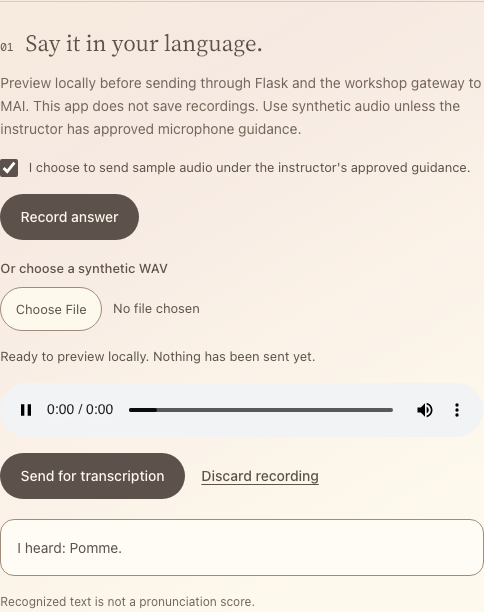
Run: save and reload the app tab. Select a pair, tick the audio checkbox,
record its translation, stop, and preview. Press Send for transcription.
Network shows multipart audio and locale; the card shows
I heard: Pomme. Note the capital and the full stop: lesson 4 handles them.
Captured with a recorded example transcript.
No microphone? Choose the synthetic WAV you downloaded in lesson 2 and use the same Send button. If a permission prompt hangs, Stop recording unlocks the file picker. Keep samples under the 12-second limit. A one-word sample should preview for under a second; about 2 seconds means speech added words, so download it again.
Catch up: python checkpoints/restore.py 03 copies this lesson's finished
files over yours, after backing yours up.
Try one
- Language hint on and off. Remove the
localesentry fromdefinition, save, and send the same WAV. Clean samples of common words usually come back unchanged. Very short words show the difference: addtree/fain Hungarian, download its WAV, and send it with and without the hint. In our tests it came back as another word without the hint (Phó,Pa.) and asFa.with it. Restore the entry. - Look at the detected language. Add
app.logger.warning("transcription: %s", payload)afterpayload = upstream_json(response)and send a one-word sample. In the Flask terminal, find the line withWARNING in app::phrases[].localeis often wrong for single words (we sawskfor FrenchPomme.). That is why the hint helps. - Word versus phrase. Compare an isolated word with a short phrase in the same language. Does the added context change the transcript?