Build a vocabulary app with MAI
Use Flask and browser JavaScript to add speech, voice answers, and memory images to a vocabulary list.
Set up your Codespace, then follow the steps below.
Work in starter/. In each model lesson you paste the controls, write the
MAI call from a short contract (a reference solution is folded underneath),
check it, and try one experiment. checkpoints/ lets you catch up;
solution/ is the finished app.
See the app in action

Silent walkthrough with example model responses. Loops at a slower pace; close this panel to hide it.
| Step | What you build | You write |
|---|---|---|
| 00 — Open the app | A page served by Flask. | — |
| 01 — Word list | Word pairs saved in the browser. | — |
| 02 — Speech | English and target-language playback. | The /speak route |
| 03 — Transcription | Recording and recognized text. | The /transcribe route |
| 04 — Matching | Feedback on the spoken answer. | normalizeAnswer |
| 05 — Images | A generated visual cue for each word. | The /image route |
Next: add MAI-Thinking mnemonics.
Which models you use
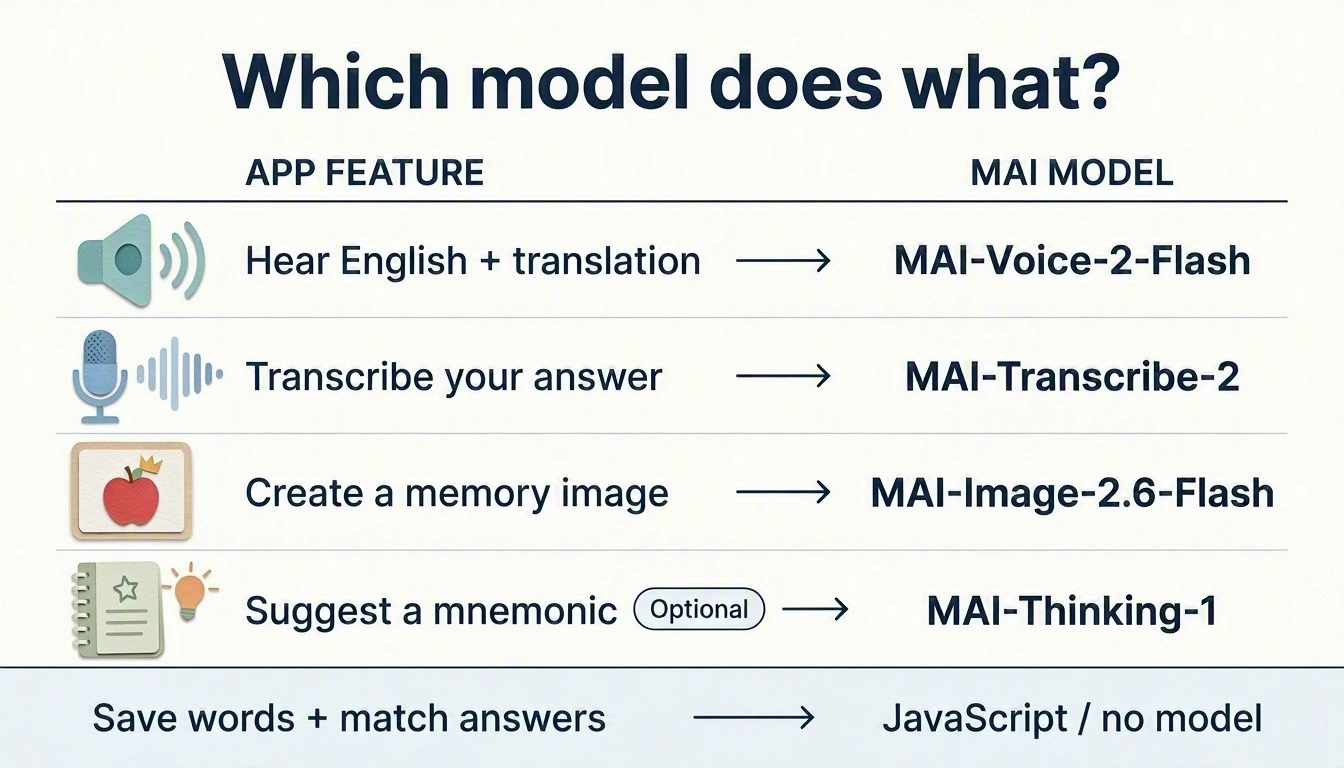
MAI-generated diagram. Full size · Prompts and revisions.
Speech reads your saved text; it does not translate it.