Hear both languages
Play the English word and its translation with MAI-Voice-2-Flash. You write the Flask route that calls the gateway; the browser wiring is a short paste.
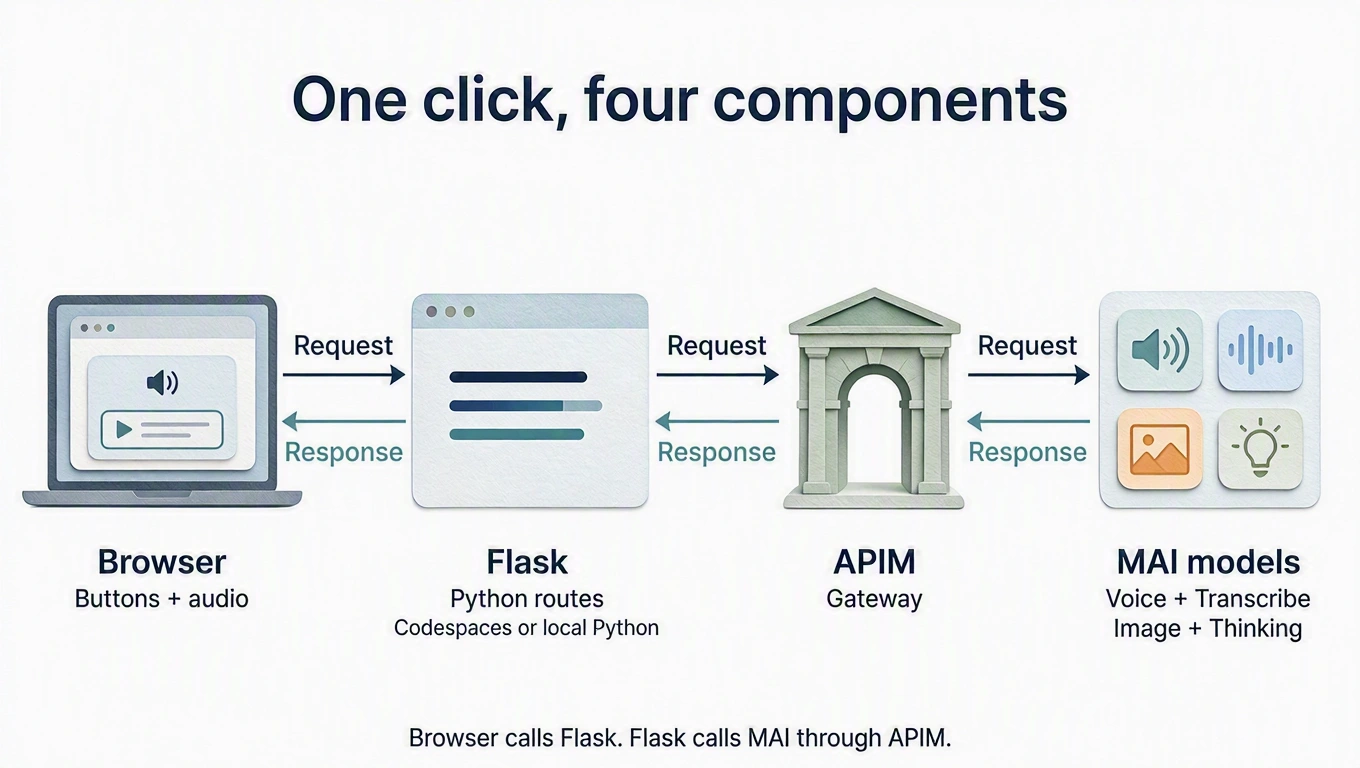
MAI-generated diagram. Full size.
How it works
The browser posts {text, locale} to your Flask route /speak. Flask adds
your key on the server and posts
SSML
to the gateway's /speech/tts; the answer is WAV audio. We ask for 16 kHz mono
PCM, which lesson 3 can upload again. The voice name in LANGUAGES picks the
speaker and the model (…:MAI-Voice-2-Flash). MAI Voice reads the text you
saved; it does not translate.
The provided workshop.py does the plumbing: gateway() returns the gateway
origin and the api-key header, json_body() and text_field() validate the
request, check_wav() rejects anything that is not 16 kHz mono PCM, and gateway
failures such as 401 or 429 become short messages in the app.
Build
What you'll build.
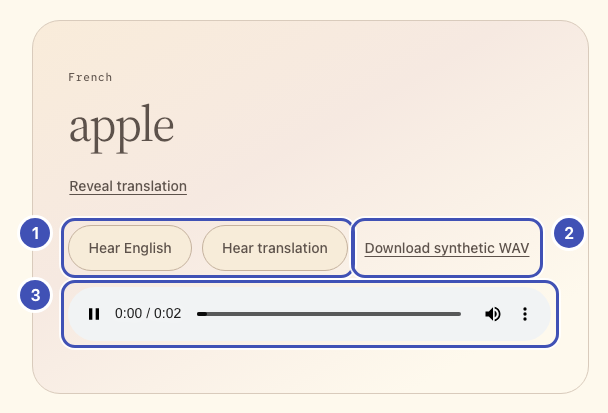
- ❶ Hear English / Hear translation: buttons from step 1; step 3 sends their word to your
/speakroute from step 2. - ❷ Download synthetic WAV: saves the same cached audio as a file for lesson 3.
- ❸ Audio player: plays the WAV that
/speakreturns.
The same numbers mark the highlighted lines in the code below. Keep or delete
those ❶ comments; they only link code to the picture.
1. Add the speech controls
Why paste the markup first?
app.js finds elements by id. The ids are the contract between the page and
your script, so the elements must exist before step 3 wires them.
In starter/templates/index.html, replace
<!-- Lesson 2: add speech controls here. --> with:
<div class="listen-actions">
  <!-- ❶ -->
  <button id="speak-english" class="button secondary" type="button">Hear English</button>
  <button id="speak-target" class="button secondary" type="button">Hear translation</button>
  <!-- ❷ -->
  <button id="download-sample" class="text-button" type="button">Download synthetic WAV</button>
</div>
<!-- ❸ -->
<audio id="speech-audio" controls hidden aria-label="Generated speech"></audio>
2. Your turn: write /speak
Why a Flask route and not a call from the browser?
The key must never reach the browser. Flask adds it on the server, checks the text, and verifies the audio before passing it on. SSML names the voice, and the voice name selects the model.
In starter/app.py, replace # Lesson 2: add the /speak route here. with a
route that follows this contract. Paste the skeleton and finish its TODOs, or
write it from scratch.
| Flask receives | POST /speak with JSON {"text": "pomme", "locale": "fr-FR"} |
| Gateway request | POST {base}/speech/tts |
| Headers | api-key from gateway(), Content-Type: application/ssml+xml, X-Microsoft-OutputFormat: riff-16khz-16bit-mono-pcm, User-Agent: mai-vocabulary-workshop |
| Body | SSML that names LANGUAGES[locale]["voice"] and contains the escaped text |
| Flask returns | The WAV bytes as audio/wav, after check_wav(audio, max_seconds=60, error_status=502) |
@app.post("/speak")
def speak():
    data = json_body()
    text = text_field(data, "text")
    locale = data.get("locale")
    language = language_for(locale)
    base, headers = gateway()
    # TODO 1: Build the SSML from the hint with escape(text) and language["voice"].
    # TODO 2: httpx.post it to f"{base}/speech/tts" with the contract's headers,
    #         content=ssml.encode("utf-8"), and timeout=TIMEOUT. Then raise_for_status().
    # TODO 3: check_wav(response.content, max_seconds=60, error_status=502) and
    #         return Response(response.content, mimetype="audio/wav").
    abort(501, "Lesson 2: finish the /speak route.")
Hint: SSML for one word
<speak version="1.0" xmlns="http://www.w3.org/2001/10/synthesis" xml:lang="fr-FR">
  <voice name="fr-FR-Soleil:MAI-Voice-2-Flash">pomme</voice>
</speak>
escape (already imported) turns & and < in the word into valid XML.
Add the extra headers to the api-key header with {**headers, ...}.
raise_for_status() lets workshop.py turn a 401 or 429 into a readable message.
Reference solution
# ❶ ❷
@app.post("/speak")
def speak():
    data = json_body()
    text = text_field(data, "text")
    locale = data.get("locale")
    language = language_for(locale)
    base, headers = gateway()
    ssml = (
        '<speak version="1.0" xmlns="http://www.w3.org/2001/10/synthesis" '
        f'xml:lang="{locale}"><voice name="{language["voice"]}">'
        f"{escape(text)}</voice></speak>"
    )
    response = httpx.post(
        f"{base}/speech/tts",
        headers={**headers, "Content-Type": "application/ssml+xml",
                 "X-Microsoft-OutputFormat": "riff-16khz-16bit-mono-pcm",
                 "User-Agent": "mai-vocabulary-workshop"},
        content=ssml.encode("utf-8"), timeout=TIMEOUT,
    )
    response.raise_for_status()
    check_wav(response.content, max_seconds=60, error_status=502)
    # ❸
    return Response(response.content, mimetype="audio/wav")
3. Wire the buttons
Why cache the audio?
Every click would otherwise be a new model request. The cache makes replay and the WAV download free, and lesson 3 reuses that WAV.
In starter/static/app.js, replace // Lesson 2: add speech here. with the
code below. speechBlob caches audio per text and locale, so replaying or
downloading does not call the model again. playAudio, stopAudio, and
downloadBlob come from workshop.js.
const speechCache = new Map();

async function speechBlob(text, locale) {
  const key = JSON.stringify([text, locale]);
  if (!speechCache.has(key)) {
    const response = await callApp("/speak", jsonOptions({text, locale}));
    if (!response.headers.get("Content-Type")?.includes("audio/wav")) {
      throw new Error("Expected WAV audio. Reopen the app if Codespaces sign-in expired.");
    }
    speechCache.set(key, await response.blob());
  }
  return speechCache.get(key);
}

// ❶
$("#speak-english").addEventListener("click", () => {
  const word = selectedWord();
  runAction("Asking MAI Voice for English audio...", async () => {
    // ❸
    await playAudio($("#speech-audio"), await speechBlob(word.english, "en-US"));
  });
});
// ❶
$("#speak-target").addEventListener("click", () => {
  const word = selectedWord();
  runAction("Asking MAI Voice for your translation...", async () => {
    // ❸
    await playAudio($("#speech-audio"), await speechBlob(word.target, word.locale));
  });
});
// ❷
$("#download-sample").addEventListener("click", () => {
  const word = selectedWord();
  runAction("Preparing synthetic target-language audio...", async () => {
    downloadBlob(await speechBlob(word.target, word.locale), `sample-${word.locale}.wav`);
  });
});
onWordChange(() => stopAudio($("#speech-audio")));
window.addEventListener("pagehide", () => stopAudio($("#speech-audio")));
Run: save; Flask reloads on its own (watch its terminal). Reload the
browser, then press Hear English and Hear translation. Network shows
POST /speak with text and locale, answered by audio/wav in about a
second. Press Download synthetic WAV and keep the file for lesson 3.
Speech varies a little per request: a one-word sample plays for under a second.
If it lasts about 2 seconds, it contains extra words; download it again.
Still seeing Lesson 2: finish the /speak route.? The skeleton's last line is still in place.
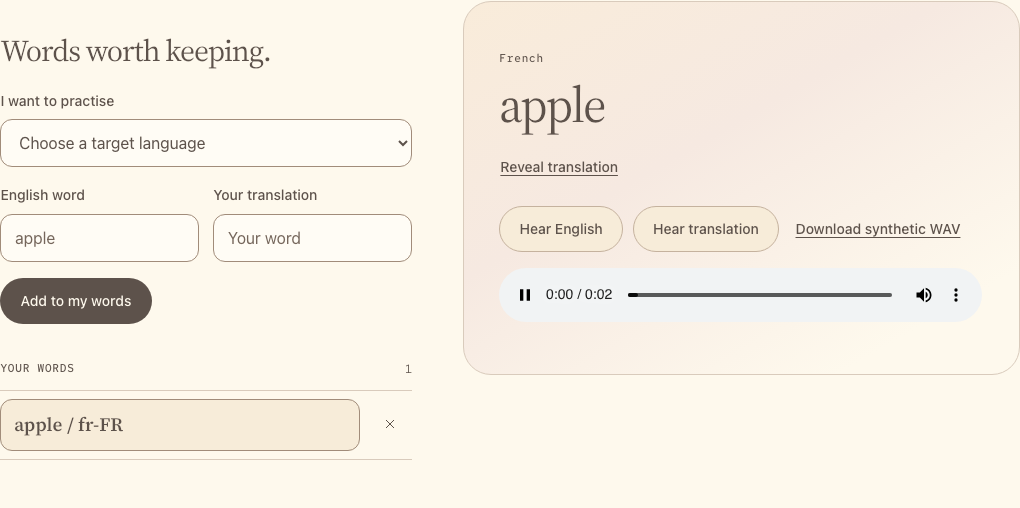
Captured with example audio responses.
Catch up: python checkpoints/restore.py 02 copies this lesson's finished
files over yours, after backing yours up.
Try one
The app caches audio per page, so reload the page after each change.
- Slow it down for learners. In your SSML, wrap the escaped text in
<prosody rate="-30%">…</prosody>. Save a short phrase such asJe voudrais une pomme, s'il vous plaît.and compare: the audio gets noticeably longer (30–60% in our tests). - Compare two voices. Add
apple/manzanafor Spanish (Spain) and Spanish (Mexico) to hear Marta and Valeria. - Compare two models. In
LANGUAGES, changefr-FR-Soleil:MAI-Voice-2-Flashtofr-FR-Soleil:MAI-Voice-2and compare the sound and the/speaktime in Network. Every menu voice exceptko-KR-Haenaalso exists for MAI-Voice-2.