Add a mnemonic
Optional, after lessons 1–5. Ask MAI-Thinking-1 for a memory aid that links
your translation to its meaning: button → Flask /mnemonic → chat completions
→ text on the card.
API details.
Build
What you'll build.
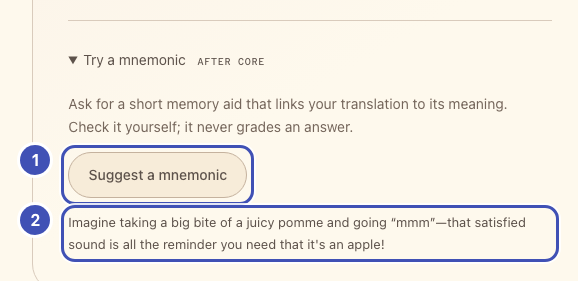
- ❶ Suggest a mnemonic: posts the word, translation, and language to
/mnemonic. - ❷ Suggestion: the plain text MAI-Thinking-1 returned.
The same numbers mark the highlighted lines in the code below. Keep or delete
those ❶ comments; they only link code to the picture.
1. Add the controls
In starter/templates/index.html, replace
<!-- Extension: add mnemonic controls here. --> with:
<details class="extension">
  <summary>Try a mnemonic <span class="eyebrow">AFTER CORE</span></summary>
  <p class="muted">Ask for a short memory aid that links your translation to its meaning. Check it yourself; it never grades an answer.</p>
  <!-- ❶ -->
  <button id="generate-mnemonic" class="button secondary" type="button">Suggest a mnemonic</button>
  <!-- ❷ -->
  <p id="mnemonic-result" class="status" role="status" aria-live="polite"></p>
</details>
2. Your turn: write /mnemonic
Why send the translation too?
A mnemonic helps only if it links the new word to its meaning. With the English word alone, the model writes English spelling tricks.
In starter/app.py, replace # Extension: add the /mnemonic route here. with
a route that follows this contract. The prompt is yours to design: name the
target language, the saved translation, and its English meaning, and ask for
plain text.
| Flask receives | POST /mnemonic with JSON {"word": "apple", "target": "pomme", "locale": "fr-FR"} |
| Gateway request | POST {base}/mai/v1/chat/completions |
| Headers | api-key from gateway(); json= sets the JSON content type |
| Body | {"model": os.getenv("MAI_THINKING_DEPLOYMENT", "mai-thinking"), "messages": [{"role": "user", "content": prompt}], "max_completion_tokens": 2048} |
| Flask returns | {"text": ...} from choices[0].message.content |
max_completion_tokens caps the output including the model's hidden
reasoning, so keep it generous. The content is plain text, not JSON. Thinking
takes 5–20 seconds, while httpx waits only 5 seconds by default, so pass
timeout=TIMEOUT as in the earlier lessons.
@app.post("/mnemonic")
def mnemonic():
    data = json_body()
    word = text_field(data, "word")
    target = text_field(data, "target")
    language = language_for(data.get("locale"))
    base, headers = gateway()
    prompt = "TODO: ask for a mnemonic that links target to word in language['label']."
    # TODO 1: httpx.post the contract's JSON body to f"{base}/mai/v1/chat/completions"
    #         with json=..., headers=headers, and timeout=TIMEOUT.
    # TODO 2: payload = upstream_json(response); read choices[0].message.content.
    # TODO 3: abort(502, ...) if it is missing or empty; else return jsonify(text=text.strip()).
    abort(501, "Extension: finish the /mnemonic route.")
Reference solution
# ❶
@app.post("/mnemonic")
def mnemonic():
    data = json_body()
    word = text_field(data, "word")
    target = text_field(data, "target")
    language = language_for(data.get("locale"))
    base, headers = gateway()
    prompt = (
        f"Write one short, imaginative mnemonic that helps an English speaker remember "
        f"that the {language['label']} word {target!r} means {word!r}. Link the sound "
        f"or spelling of {target!r} to that meaning. Use at most two sentences of plain "
        f"text without Markdown. Do not claim that it is a verified fact."
    )
    response = httpx.post(
        f"{base}/mai/v1/chat/completions", headers=headers,
        json={
            "model": os.getenv("MAI_THINKING_DEPLOYMENT", "mai-thinking"),
            "messages": [{"role": "user", "content": prompt}],
            "max_completion_tokens": 2048,
        }, timeout=TIMEOUT,
    )
    payload = upstream_json(response)
    choices = payload.get("choices")
    if not isinstance(choices, list) or not choices or not isinstance(choices[0], dict):
        abort(502, "The reasoning model returned no suggestion.")
    message = choices[0].get("message")
    text = message.get("content") if isinstance(message, dict) else None
    if not isinstance(text, str) or not text.strip():
        abort(502, "No text suggestion was returned. The model may have used its whole output budget.")
    # ❷
    return jsonify(text=text.strip())
3. Wire the button
In starter/static/app.js, replace // Extension: add mnemonics here. with:
// ❶
$("#generate-mnemonic").addEventListener("click", () => {
  const word = selectedWord();
  runAction("MAI Thinking is considering your word...", async () => {
    const response = await callApp("/mnemonic", jsonOptions({
      word: word.english, target: word.target, locale: word.locale,
    }));
    const result = await appJSON(response);
    if (typeof result.text !== "string" || !result.text.trim()) {
      throw new Error("No text suggestion was returned.");
    }
    // ❷
    $("#mnemonic-result").textContent = result.text;
  });
});
onWordChange(() => {
  $("#mnemonic-result").textContent = "";
});
Run: save and reload, select a word, expand Try a mnemonic, and press
Suggest a mnemonic. The suggestion appears on the card in about 5–20
seconds. textContent shows it as plain text, even if the model sends markup.
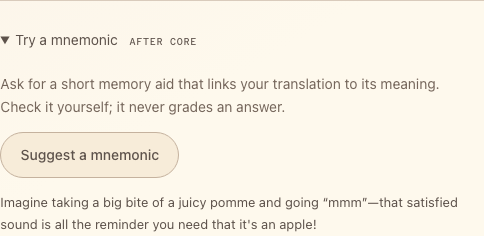
Captured with a recorded example response.
Try one
- Ask for
one simple example sentence in {language['label']} that uses
  {target!r}, followed by its English translation
instead of a mnemonic. - Replace
imaginativewithpractical and understatedand compare.
Request the same word each time and keep your preferred prompt. Answer matching stays deterministic; the model never grades an answer.